Why a Well-Structured Cafe Menu Drives Higher Check Averages and Faster Table Decisions
Whether you run a specialty third-wave espresso bar, an artisan bakery-cafe, or a busy neighborhood bistro, your menu is far more than a list of beverages and prices—it is your venue's primary merchandising engine. Within the first 10 seconds of scanning a tabletop QR code, a guest should be able to navigate categories effortlessly with one thumb, picture the aroma and texture of your signature drinks and pastries, and verify final tax-inclusive prices with complete confidence.
Instead of generic design theory, this guide walks through 4 real 390px mobile screenshots captured directly from our live Naponi Demo Cafe interactive menu. We break down category hierarchy, high-converting item descriptions, allergen and calorie labeling, and compliant price writing rules you can apply to your own cafe today.
Walkthrough 1: First Impressions, Utility Header, and Category Architecture
What a guest sees above the fold immediately after scanning your table QR code sets the tone for the entire visit. Below is the real 390px mobile opening screen of Naponi Demo Kafe:
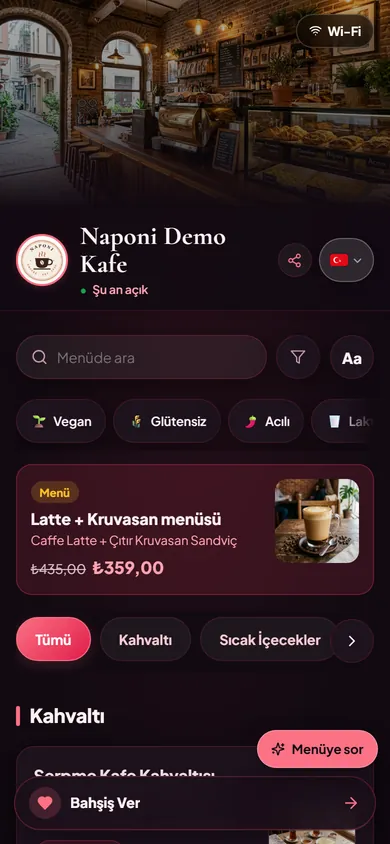
1. Header Utilities: Live Open Status, Wi-Fi Pill, and 11-Language Selector
In any cafe where guests work on laptops or catch up with friends, the most frequent question asked of baristas is "What's the Wi-Fi password?" Placing a one-tap Wi-Fi pill in the top-right corner of the menu header lets guests copy the network credentials without interrupting counter service. Right below the cover photo, the venue logo, real-time "Open now" indicator, share button, and flag-based 11-language selector give guests instant orientation.
2. Instant Search, Dietary Filter Pills, and the Aa Readability Toggle
Directly beneath the venue title, guests find a fast keyword search bar, a funnel icon for filtering out any of the 14 major food allergens, and an Aa accessibility button that enlarges text for effortless reading. One row lower, quick dietary chips—🌱 Vegan, 🌾 Gluten-Free, and 🌶️ Spicy—allow guests with specific dietary preferences to filter the entire 36-item catalog with a single tap.
3. High-Converting Category Order and Featured Bundle Cards
Naponi Demo Cafe organizes its 36 items across 6 intuitive categories: Breakfast (Kahvaltı), Hot Beverages (Sıcak İçecekler), Cold Beverages (Soğuk İçecekler), Desserts (Tatlılar), Main Courses (Ana Yemekler), and Snacks & Starters (Atıştırmalıklar). Right above the category bar sits a featured combo card—"Latte + Croissant Sandwich"—showing the regular combined price (₺435,00) crossed out beside the bundle price (₺359,00). Positioning a high-margin coffee-and-pastry pairing above the fold naturally lifts average order value before the guest even scrolls.
Walkthrough 2: How to Write Appetizing Coffee and Beverage Descriptions
One of the most common mistakes on cafe menus is listing bare item names—"Caffè Latte — 145" or "Flat White — 155"—with zero context. When guests know the roast profile, shot count, and milk texture, they order specialty drinks with confidence. Let's look at the Hot Beverages section of Naponi Demo Cafe:
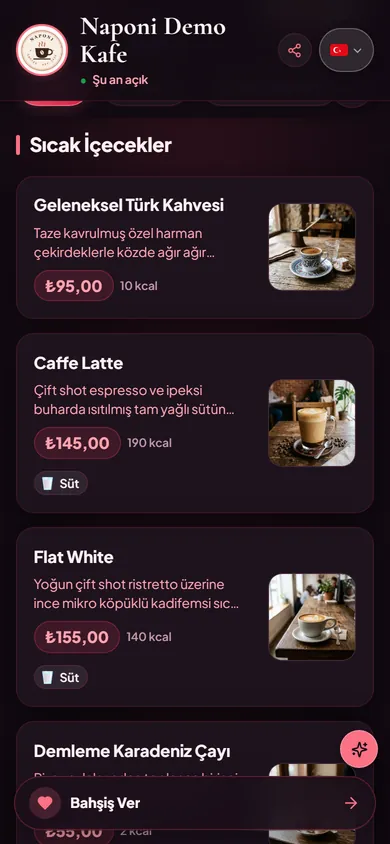
1. The "Ingredient Origin + Craft Technique + Texture" Copywriting Formula
Notice how each beverage card in Figure 2 answers the exact questions a coffee lover has before ordering:
- Traditional Turkish Coffee (Geleneksel Türk Kahvesi): Specifies freshly roasted house-blend beans, slow brewing over embers, and the complimentary double-roasted Turkish delight served alongside.
- Caffè Latte: Explicitly notes a "double shot of espresso balanced with silky steamed whole milk," removing any guesswork about whether the drink comes with a single or double shot.
- Flat White: Distinguishes itself from the Latte by highlighting "intense double-shot ristretto topped with thin, velvety micro-foamed milk."
If writing polished copy for dozens of items feels daunting, you can use the "AI Description Suggestion" button inside Naponi AI Menu to generate concise, sensory descriptions (under 280 characters) tailored to each item, and pair them with studio-grade visuals as explained in our guide on AI food and menu photography for restaurants.
2. Upfront Calorie Counts and Allergen Badges
Next to each price pill, guests see transparent energy values (10 kcal, 190 kcal, 140 kcal) and a clear 🥛 Dairy (Süt) allergen badge below milk-based espresso drinks—saving lactose-sensitive guests from having to ask at the counter.
Walkthrough 3: Dessert Merchandising, Campaign Pricing, and Multi-Allergen Tags
Pastries and desserts deliver some of the highest margins in any cafe operation. Figure 3 shows how Naponi Demo Cafe presents its Desserts (Tatlılar) category:
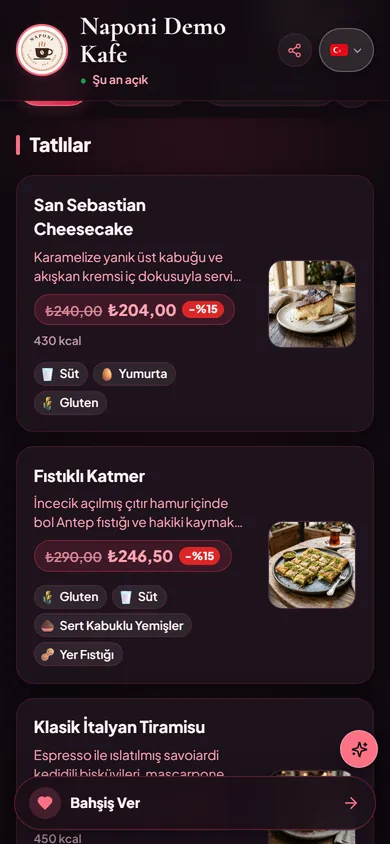
Both San Sebastian Cheesecake (₺240,00 crossed out to ₺204,00 -15%) and Pistachio Katmer (Fıstıklı Katmer) (₺290,00 crossed out to ₺246,50 -15%) combine vivid texture cues (caramelized burnt top crust and creamy flowing center; paper-thin crispy phyllo with generous Antep pistachios and clotted cream) with complete 14-allergen disclosures (🥛 Dairy, 🥚 Eggs, 🌾 Gluten, 🌰 Tree Nuts, and 🥜 Peanuts).
Walkthrough 4: Cafe Menu Price Writing Tips and Regulatory Compliance
How you write and format prices on your cafe menu impacts both guest trust and regulatory inspections. Below is the English view (?lang=en) of Naponi Demo Cafe, demonstrating how translated menus preserve exact local currency pricing:
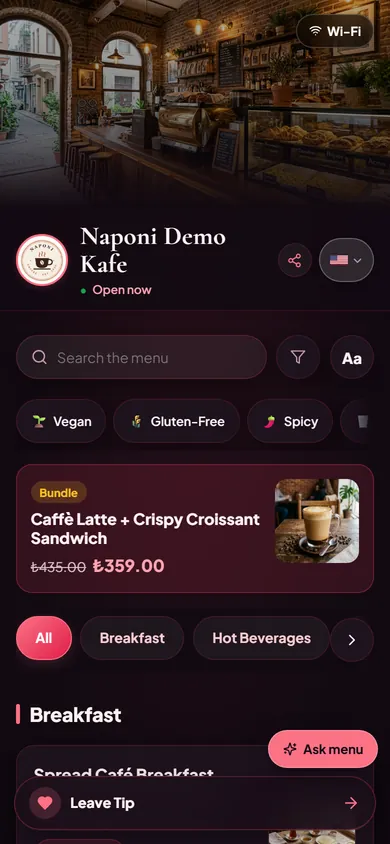
1. Always Show Final VAT-Inclusive Prices (No Hidden Surcharges)
As explained in our comprehensive guide to restaurant menu price display rules and QR menu laws (H3 compliance guide), consumer protection regulations across the European Union (Directive 98/6/EC), the UK, and Türkiye (Price Tag Regulation Articles 5 and 9) require every item price on a cafe or restaurant menu to be the final, tax-inclusive (VAT-included) amount. Furthermore, Türkiye's January 30, 2026 amendment (Official Gazette No. 33153) strictly bans mandatory service charges, table fees, or cover charges (kuver). The price shown on the menu card must match the exact amount charged at the register.
2. Clear Currency Symbols and Consistent Decimal Formatting
Always display your venue's official charging currency symbol (such as ₺, €, £, or $) directly on every price pill. When international tourists switch the menu language to English, German, or Arabic, keep the prices in the venue's actual billing currency rather than informal exchange-rate estimates so there is never a discrepancy at the payment terminal. Maintain uniform decimal formatting (e.g., ₺145.00 and ₺246.50) across all categories for visual clarity.
3. Make Milk Alternatives and Add-On Modifiers Transparent
In coffee shops, guests frequently customize drinks with oat milk, almond milk, extra espresso shots, or flavored syrups. Using Naponi's Option Groups feature, you can list exact modifier prices underneath each beverage so guests see the full cost of customizations upfront. To build your own cafe menu step by step, read how to set up a QR menu for cafes and restaurants.
Naponi Demo Cafe's 6 Categories: Complete Menu & Pricing Blueprint Table
You can use the blueprint table below—modeled directly on the 6 categories and 36 items of Naponi Demo Cafe—as a ready-made template when structuring your own cafe's categories, descriptions, and pricing strategy:
| Category Name | Sample Items (Naponi Demo Cafe) | Description Copywriting Focus | Pricing & Tagging Strategy |
|---|---|---|---|
| 1. Breakfast | Spread Café Breakfast & Avocado Poached Eggs | Lists regional cheeses (Ezine white cheese, aged kashar), comb honey, clotted cream (kaymak), olives, and warm simit. | Tax-inclusive platter price + Eggs, Dairy, and Gluten allergen badges. |
| 2. Hot Beverages | Traditional Turkish Coffee, Caffè Latte, Flat White | Highlights roast profile, espresso shot count (double-shot ristretto), and steamed milk texture (velvety micro-foam). | Clear cup price + upfront kcal energy count and Dairy allergen tag. |
| 3. Cold Beverages | Matcha Iced Latte, Cold Brew, Homemade Lemonade | Emphasizes steeping hours, botanical or fresh citrus notes, and refreshing iced presentation. | Plant-based milk Option Groups + Vegan / Dairy filter compatibility. |
| 4. Desserts | San Sebastian Cheesecake, Pistachio Katmer, Classic Tiramisu | Contrasts textures (caramelized top crust, creamy center, paper-thin crispy phyllo with Antep pistachios). | Strikethrough campaign pricing (-15%) to drive afternoon coffee cross-sells. |
| 5. Main Courses | Grilled Chicken Café Bowl & Artisan Pastas | Explains cooking technique, house-made sauce ingredients, and fresh grain/greens balance. | Full lunch/dinner entree pricing + Gluten-Free / High-Protein dietary tags. |
| 6. Snacks & Starters | Crispy Croissant Sandwich & Gluten-Free Blueberry Muffin | Clarifies quick savory bites and certified gluten-free or vegan baking ingredients. | Paired in the top-of-menu bundle card (Latte + Croissant) to lift average ticket size. |
Build a Cafe Menu Just Like Naponi Demo Cafe in 2 Minutes
Give your guests sticky category tabs, bundle promotions, 14-allergen filters, and 11 languages at zero cost. Launch your venue on Naponi's free QR menu platform today—no credit card required.
Create Free QR Menu →Frequently Asked Questions
What is the best category order for a modern cafe or coffee shop menu?
Structure your categories around the natural guest decision flow: start with a featured combo/bundle card at the top (e.g., Latte + Croissant Sandwich), followed by Breakfast, Hot Beverages, Cold Beverages, Desserts, Main Courses, and Snacks. With Naponi's time-based highlights, you can automatically surface Breakfast in the morning and Desserts & Coffee in the afternoon.
How long should cafe menu item descriptions be on a mobile QR menu?
For optimal readability on a 390px smartphone screen, keep item descriptions between 12 and 25 words (roughly 90–160 characters). Highlight the key origin or ingredient (e.g., double-shot ristretto, aged Ezine cheese), the preparation method (slow-brewed, stone-baked), and texture or accompaniments.
How should currency symbols and taxes (VAT) be displayed on a cafe menu?
Under consumer price transparency regulations across the EU, the UK, and Türkiye (Price Tag Regulation Articles 5 and 9), all menu prices must be displayed as a single final price inclusive of VAT and all mandatory taxes, accompanied by the clear currency symbol (such as ₺, €, £, or $). Adding "+ VAT" or mandatory cover/service fees at the bottom of the menu violates consumer protection rules.
How should discounted bundles or pastry campaigns be formatted on a digital menu?
Display the regular combined price with a clean strikethrough (for example, ₺435.00) right next to the bold promotional price (₺359.00) and a percentage badge (such as -15%) so guests immediately recognize the value without doing mental math.
Where can I test the live Naponi Demo Cafe menu on my own phone?
You can open naponi.com/menu/r49EHANlJZ4uN0lWGveypQ (or ?lang=en for the English view) directly in your mobile browser with zero app downloads or sign-ups to explore all 6 categories, 36 items, 14-allergen filters, 11 languages, and the AI menu assistant.
Empower Your Venue with Digital Tipping
Ensure your team never misses out on gratuities when guests carry no cash. Zero hardware costs, 2-minute setup.
Get Started Free →